SYNTHETIC SCANNED BANK EXAMPLE
Convert a scanned bank statement to CSV
This scanned example includes a source page preview and vision review markers. Check every date, description, sign, and balance against the original page before export.
Expected output for Example Bank
Synthetic example. We processed this synthetic PDF on 4 October 2026 and matched the expected table: 4 bank rows. The scanned sample keeps a manual vision warning on each row. This page keeps the table as a static reference for review and export demonstration.
Source page preview
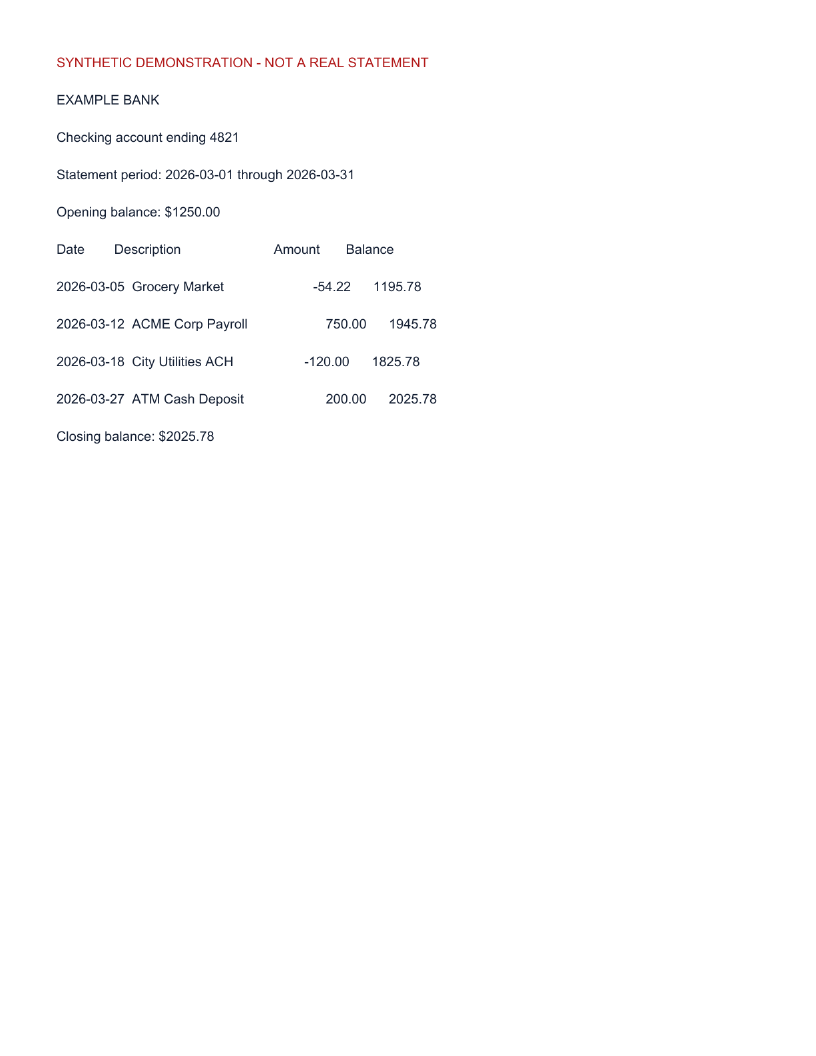
Synthetic source preview. Vision rows require manual source review.
Matched transaction table
| Date | Description | Amount | Balance |
|---|---|---|---|
| 2026-03-05 | Grocery MarketVISION_SOURCE_REVIEW | USD -54.22 | USD 1195.78 |
| 2026-03-12 | ACME Corp PayrollVISION_SOURCE_REVIEW | USD 750.00 | USD 1945.78 |
| 2026-03-18 | City Utilities ACHVISION_SOURCE_REVIEW | USD -120.00 | USD 1825.78 |
| 2026-03-27 | ATM Cash DepositVISION_SOURCE_REVIEW | USD 200.00 | USD 2025.78 |
4 expected rows · Opening $1,250.00 plus net bank activity $775.78 equals closing $2,025.78.
Review and demonstrate an edit
Compare each row with the source preview, confirm the date and signed amount, then restore the source value before export. For example, changing Grocery Market from -54.22 to -54.20 creates a $0.02 difference; restore -54.22 from the source and recheck. Keep the corrected source value as the final row so an edit history does not preserve a misleading wrong amount. A matching balance is a consistency check, not an accuracy guarantee.
For scanned pages, manually resolve any VISION_SOURCE_REVIEW marker when a glyph, date, or amount is unclear.
The Convert your own file link opens the workspace; it does not automatically load this synthetic sample.